Offline PDF Sharing
Package PDFs into encrypted HTML files stored on USB drives or local networks. Each opening requires a 5ms online verification — files stay in your hands while you control access remotely.
6 min read March 23, 2026 Security
Package PDFs into encrypted HTML files stored on USB drives or local networks. Each opening requires a 5ms online verification — files stay in your hands while you control access remotely.
6 min read March 23, 2026 Security
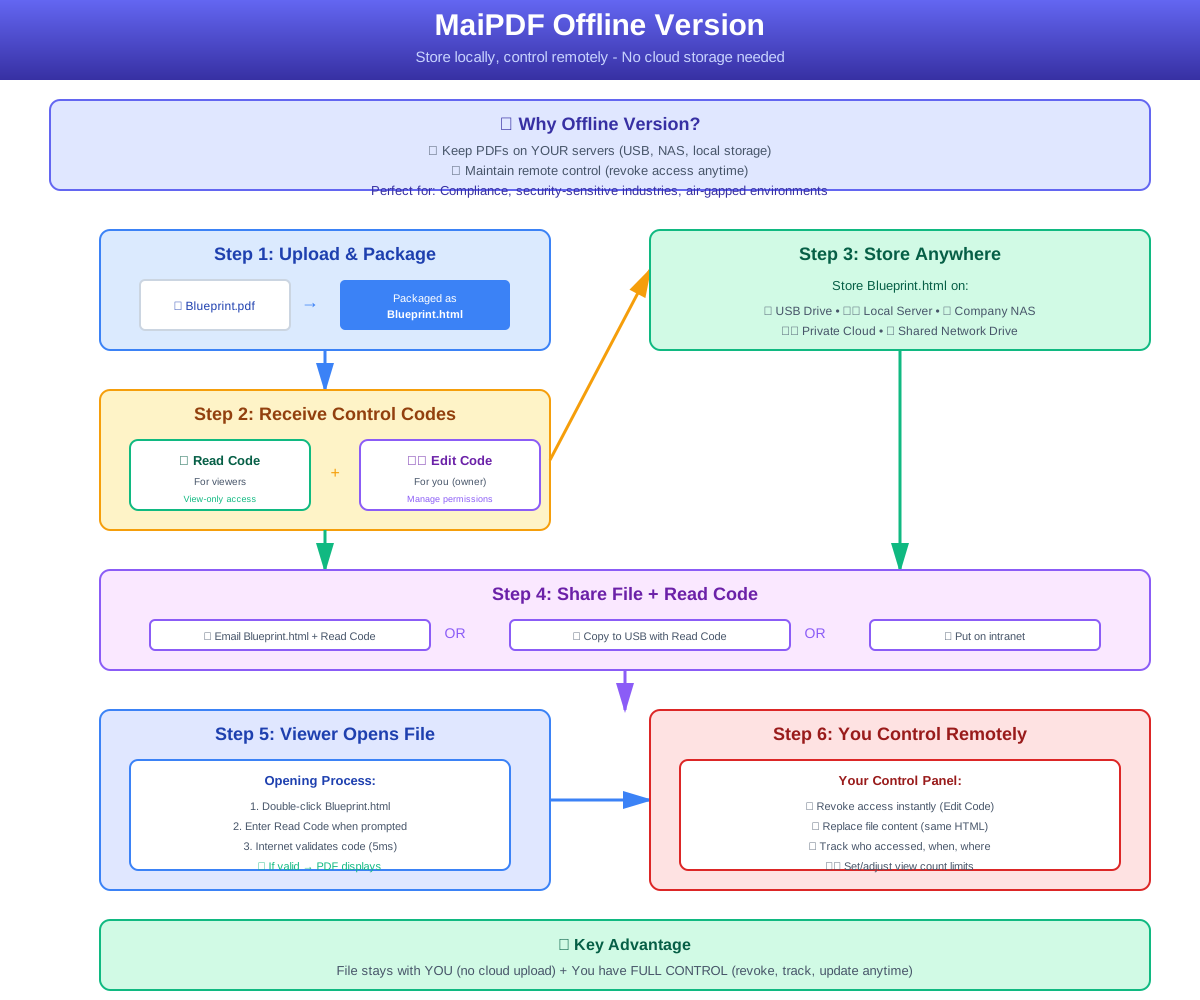
Uploading confidential PDFs to the cloud means surrendering control. Pure local encryption means no way to revoke access once the file is sent. MaiPDF's Offline Version bridges both worlds: your PDF is packaged into a self-contained encrypted HTML file that lives on your USB drive, NAS, or internal server — but every time someone opens it, a lightning-fast 5ms handshake confirms they still have permission. Files in your hands, access rules in the cloud.
How It Works
Drag and drop your PDF. The file is encrypted and encapsulated into a standalone HTML package within 30 seconds.

Configure view limits, expiration dates, IP locks, region restrictions, watermarks, and no-print/no-copy rules.

Get your encrypted HTML file plus access/edit codes and a QR code. Copy it to a USB drive, NAS, or share directly.

Core Features
Your PDF is encapsulated into a single HTML file. Copy it to a USB drive, private NAS, or air-gapped machine — no cloud upload required.
A 5ms background handshake checks the read code, remaining views, and expiration date. No connection at open time means no access.
Read Code grants view-only access. Encode lets you replace files, add views, or revoke permissions — a built-in "regret button" for every share.
Every verification request logs IP address and timestamp. See who viewed, when access ended, and export the full audit trail to CSV.
Browser-level disabling of print menus, right-click context menus, and keyboard shortcuts prevents unauthorized reproduction.
Automatically overlays date + IP address when the file is opened. Even screenshots can be traced back to the source.
The authorization handshake uses an encrypted HTTPS channel, preventing man-in-the-middle attacks from tampering with permissions.
Deducts a view on open and invalidates when the window closes. Prevents screenshots via background streaming and session locking.
Comparison
Use Cases
FAQ
Related Reading
Share sensitive business documents without data breach risk using layered protection.
Monitor who views your PDFs with real-time analytics, IP tracking, and audit trails.
Add dynamic watermarks to trace leaks and deter unauthorized distribution.
Upload a confidential PDF. Generate an encrypted offline HTML package. Copy it to a USB drive or NAS — and revoke access anytime from your dashboard.
Updated MaiPDF protection path
SendPDFOnline pages now describe MaiPDF as a two-level product family: Online Cloud Sharing creates quick browser links and QR codes, while the MaiPDF App creates protected .maipdf packages for sensitive PDFs that need App DRM controls.
Upload a PDF, share a browser link or QR code, and keep read code / modify code management.
Package the PDF in the MaiPDF App with local encryption, license rules, expiry, open limits, and revoke control.
Use protected viewer, device binding, screenshot-aware controls, watermark trace, and license management where supported.
No web page can fully stop screenshots. MaiPDF App DRM is positioned as the stronger path: reduce casual copying, bind access to identity/devices, revoke licenses, and trace leaks with visible watermark information.